This lab gives you hands-on practice manipulating BGP path selection using route-maps, prefix-lists, AS-path prepending, local preference, MED, and communities. You will control how traffic enters and leaves your autonomous system by modifying BGP attributes at each peer boundary.
  Loopbacks: 10.1.1.0/24         Loopbacks: 10.3.1.0/24
             10.1.2.0/24                    10.3.2.0/24
                  │                               │
        ┌─────────┴─────────┐       ┌─────────────┴────────┐
        │       R1           │       │       R3              │
        │   AS 100           │       │   AS 300              │
        │   1.1.1.1/32       │       │   3.3.3.3/32         │
        └────────┬───────────┘       └──────────────┬───────┘
                 │ 192.168.12.0/24                  │ 192.168.23.0/24
                 │                                  │
        ┌────────┴──────────────────────────────────┤
        │                  R2                        │
        │              AS 200                        │
        │           2.2.2.2/32                       │
        └─────────────────────────┬─────────────────┘
                                  │ 192.168.24.0/24
                                  │
                      ┌───────────┴────────┐
                      │       R4            │
                      │   AS 400            │
                      │   4.4.4.4/32       │
                      │ Loopbacks:          │
                      │  10.3.1.0/24        │
                      │  10.3.2.0/24        │
                      └────────────────────┘
| Router | AS | Router-ID | Interfaces | Role |
|---|---|---|---|---|
R1 | 100 | 1.1.1.1 | Gi0/0 → 192.168.12.1 | BGP Client / Traffic Source |
R2 | 200 | 2.2.2.2 | Gi0/0 Gi0/1 Gi0/2 | Hub / Route Reflector candidate |
R3 | 300 | 3.3.3.3 | Gi0/0 → 192.168.23.3 | Primary upstream / prefix source |
R4 | 400 | 4.4.4.4 | Gi0/0 → 192.168.24.4 | Alternate upstream / prefix source |
R3 and R4 both advertise 10.3.1.0/24 and 10.3.2.0/24 into R2. This deliberate overlap is what makes the path-selection exercises meaningful — R2 must choose between two valid paths.
bgp-routemap-lab.yaml via Lab → Importbgp-routemap-lab.yaml.On R2, confirm all three peers are established:
R2# show bgp ipv4 unicast summary
Expected output — all neighbours should show a numeric value in the State/PfxRcd column (not Idle or Active):
Neighbor        V           AS MsgRcvd MsgSent   TblVer  InQ OutQ Up/Down  State/PfxRcd
192.168.12.1    4          100      12      12        7    0    0 00:05:12        3
192.168.23.3    4          300      10      10        7    0    0 00:05:08        3
192.168.24.4    4          400      10      10        7    0    0 00:05:04        3
R2# show bgp ipv4 unicast
You should see 10.3.1.0/24 and 10.3.2.0/24 with two candidate paths each (from AS300 and AS400).
Scenario: R2 receives 10.3.1.0/24 from both R3 (AS300) and R4 (AS400).
By default, the tie-break may be arbitrary. Force R2 to always prefer the path via R3 for this prefix by setting a higher local preference.
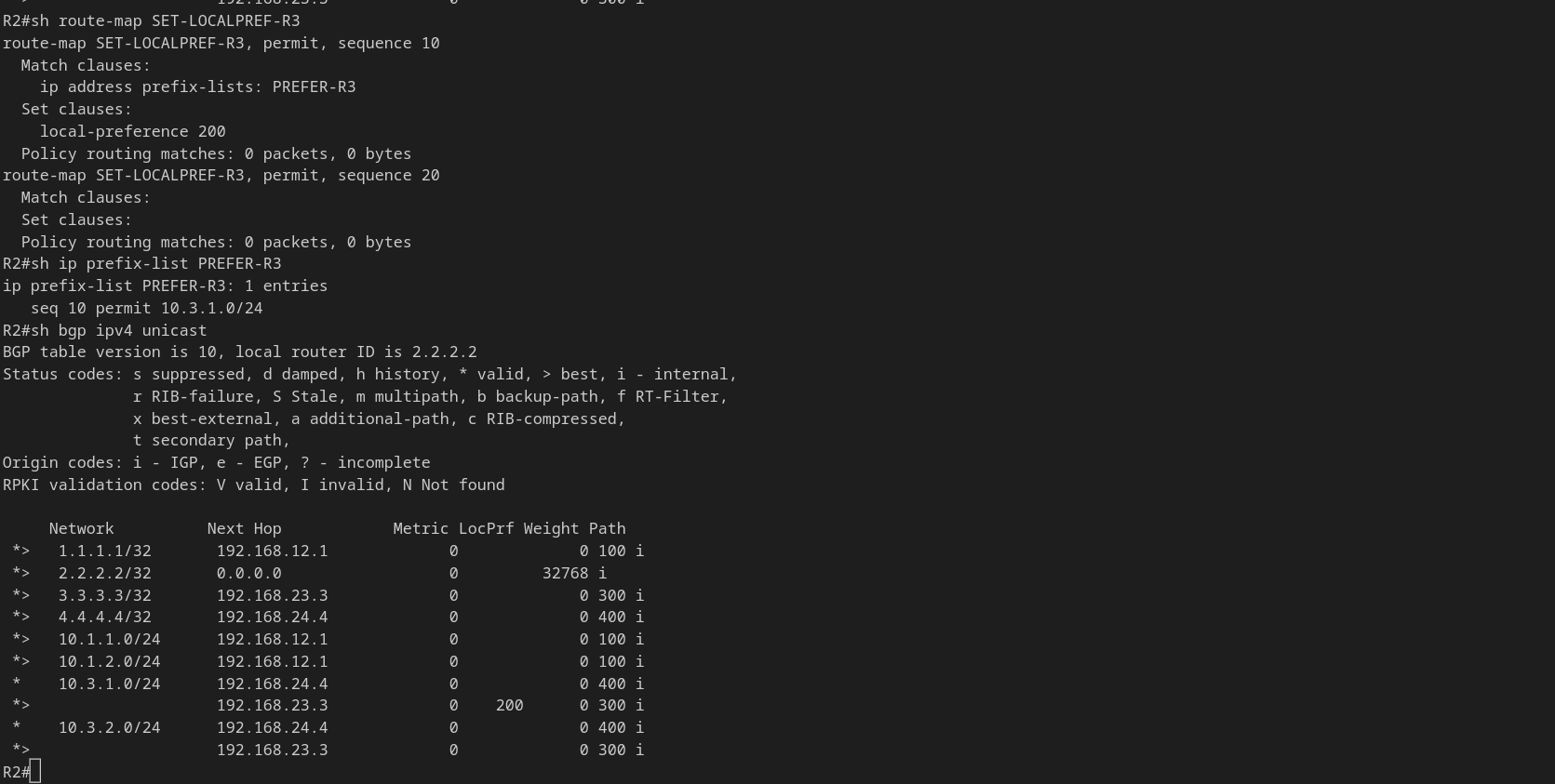
R2(config)# ip prefix-list PREFER-R3 seq 10 permit 10.3.1.0/24

R2(config)# route-map SET-LOCALPREF-R3 permit 10
R2(config-route-map)#  match ip address prefix-list PREFER-R3
R2(config-route-map)#  set local-preference 200
R2(config-route-map)# exit
R2(config)# route-map SET-LOCALPREF-R3 permit 20
R2(config-route-map)# exit
R2(config)# router bgp 200
R2(config-router)#  neighbor 192.168.23.3 route-map SET-LOCALPREF-R3 in
R2(config-router)#  end
R2# clear ip bgp 192.168.23.3 soft in
R2# show bgp ipv4 unicast 10.3.1.0/24
The best path (>) should now show Local preference 200 via 192.168.23.3.
BGP Decision rule: Higher local preference wins. Default is 100. Local preference is only meaningful within the same AS — it is not propagated to eBGP peers.
Scenario: You want external ASes to prefer sending traffic for 10.3.2.0/24 via R3. Prepend extra AS hops on the advertisement sent to R4 to make that path look longer (less preferred).
R2(config)# ip prefix-list PREPEND-OUT seq 10 permit 10.3.2.0/24
R2(config)# route-map PREPEND-TO-R4 permit 10
R2(config-route-map)#  match ip address prefix-list PREPEND-OUT
R2(config-route-map)#  set as-path prepend 200 200 200
R2(config-route-map)# exit
R2(config)# route-map PREPEND-TO-R4 permit 20
R2(config-route-map)# exit
R2(config)# router bgp 200
R2(config-router)#  neighbor 192.168.24.4 route-map PREPEND-TO-R4 out
R2(config-router)#  end
R2# clear ip bgp 192.168.24.4 soft out
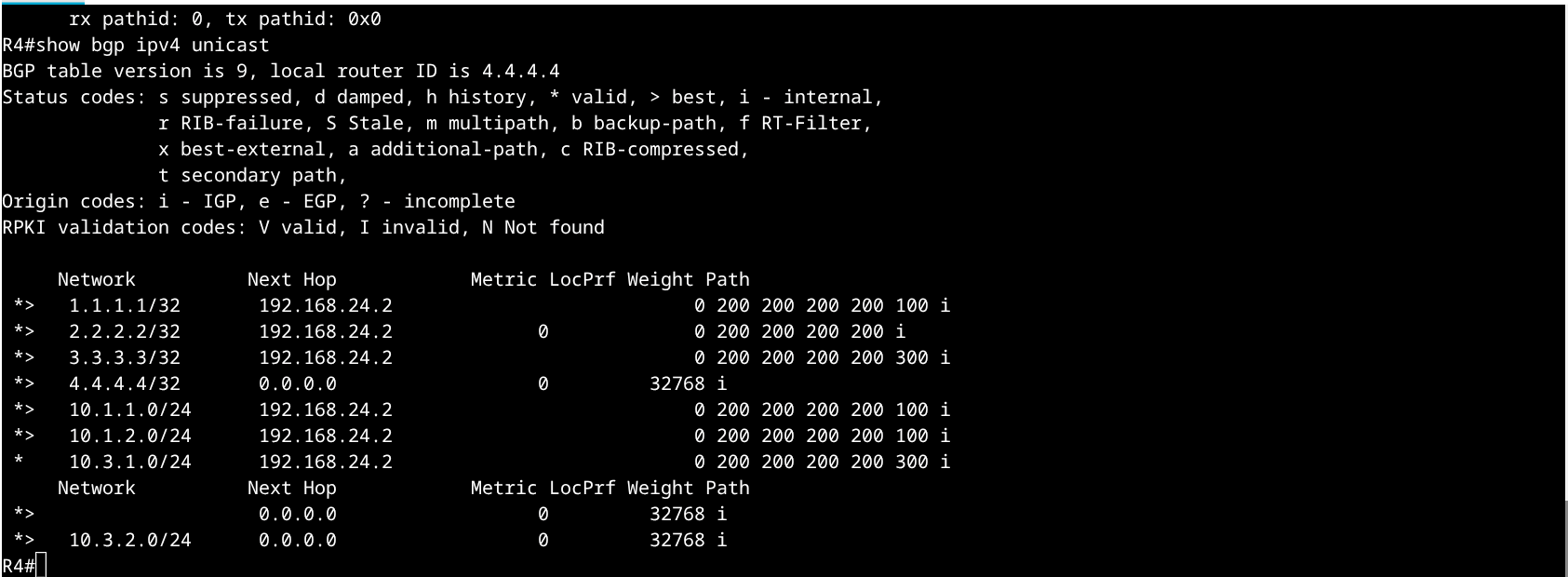
R4# show bgp ipv4 unicast 10.3.2.0/24
The path via R2 should now show a longer AS-path: 200 200 200 300. If R4 has another path available it will prefer it; otherwise this path remains best but is now less attractive to any downstream peers.
Scenario: R2 wants to tell R1 which of its two upstream links (via R3 or via R4) to prefer for return traffic to 2.2.2.2/32. Use MED to signal link preference to R1.
R2(config)# route-map SET-MED-LOW permit 10
R2(config-route-map)#  set metric 50
R2(config-route-map)# exit

R2(config)# router bgp 200
R2(config-router)#  neighbor 192.168.12.1 route-map SET-MED-LOW out
R2(config-router)#  end
R2# clear ip bgp 192.168.12.1 soft out
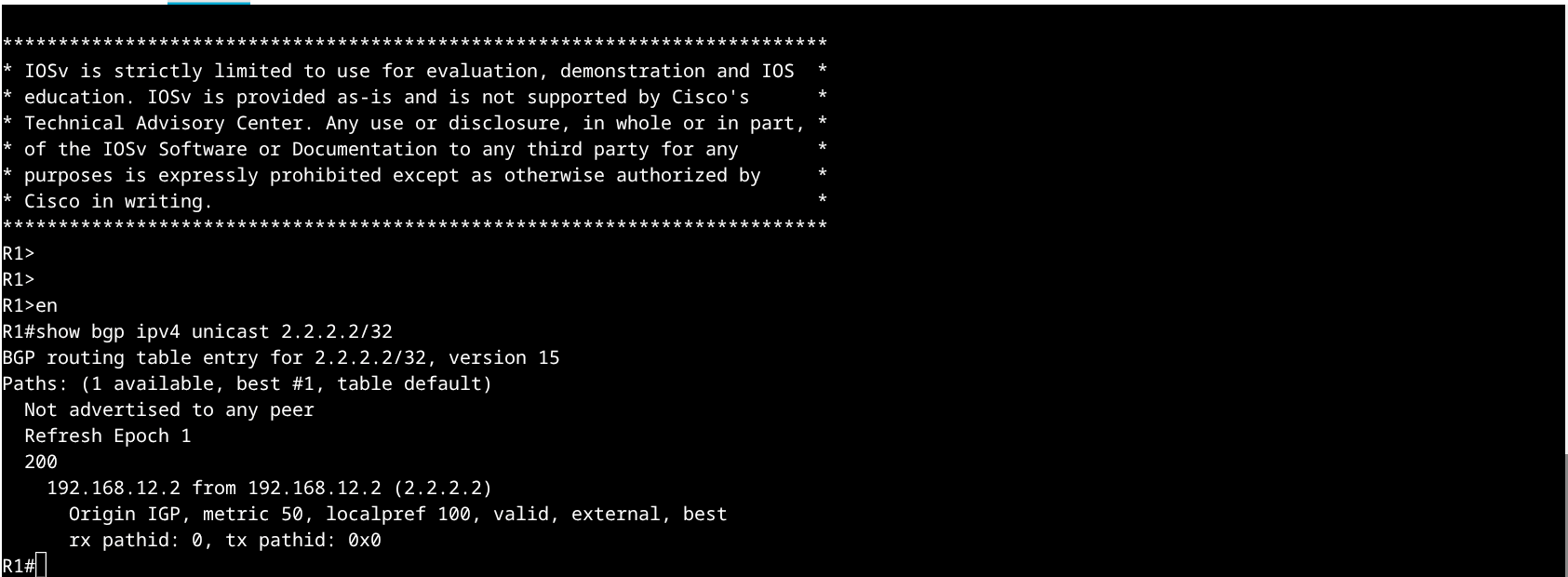
R1# show bgp ipv4 unicast 2.2.2.2/32
The route should show metric 50 in the BGP table. A lower MED is preferred (when comparing paths from the same neighbouring AS).
MED is only compared between paths received from the same neighbouring AS by default. Enable bgp always-compare-med under the BGP process if you want MED compared across different ASes — but understand the implications before using it in production.
Scenario: R1 tags its prefixes with a community value, and R2 applies different local preferences based on that community — a common ISP policy pattern.
R1(config)# ip prefix-list TAG-PREFIX seq 10 permit 10.1.1.0/24

R1(config)# route-map TAG-COMMUNITY permit 10
R1(config-route-map)#  match ip address prefix-list TAG-PREFIX
R1(config-route-map)#  set community 100:500
R1(config-route-map)# exit
R1(config)# route-map TAG-COMMUNITY permit 20
R1(config-route-map)# exit

R1(config)# router bgp 100
R1(config-router)#  neighbor 192.168.12.2 route-map TAG-COMMUNITY out
R1(config-router)#  end
R1# clear ip bgp 192.168.12.2 soft out
R2(config)# ip community-list standard HIGHPREF-COMM permit 100:500

R2(config)# route-map COMM-LOCALPREF permit 10
R2(config-route-map)#  match community HIGHPREF-COMM
R2(config-route-map)#  set local-preference 300
R2(config-route-map)# exit
R2(config)# route-map COMM-LOCALPREF permit 20
R2(config-route-map)# exit

R2(config)# router bgp 200
R2(config-router)#  neighbor 192.168.12.1 route-map COMM-LOCALPREF in
R2(config-router)#  end
R2# clear ip bgp 192.168.12.1 soft in
R2# show bgp ipv4 unicast 10.1.1.0/24
Look for Local preference: 300 and the community 100:500 in the detailed output.
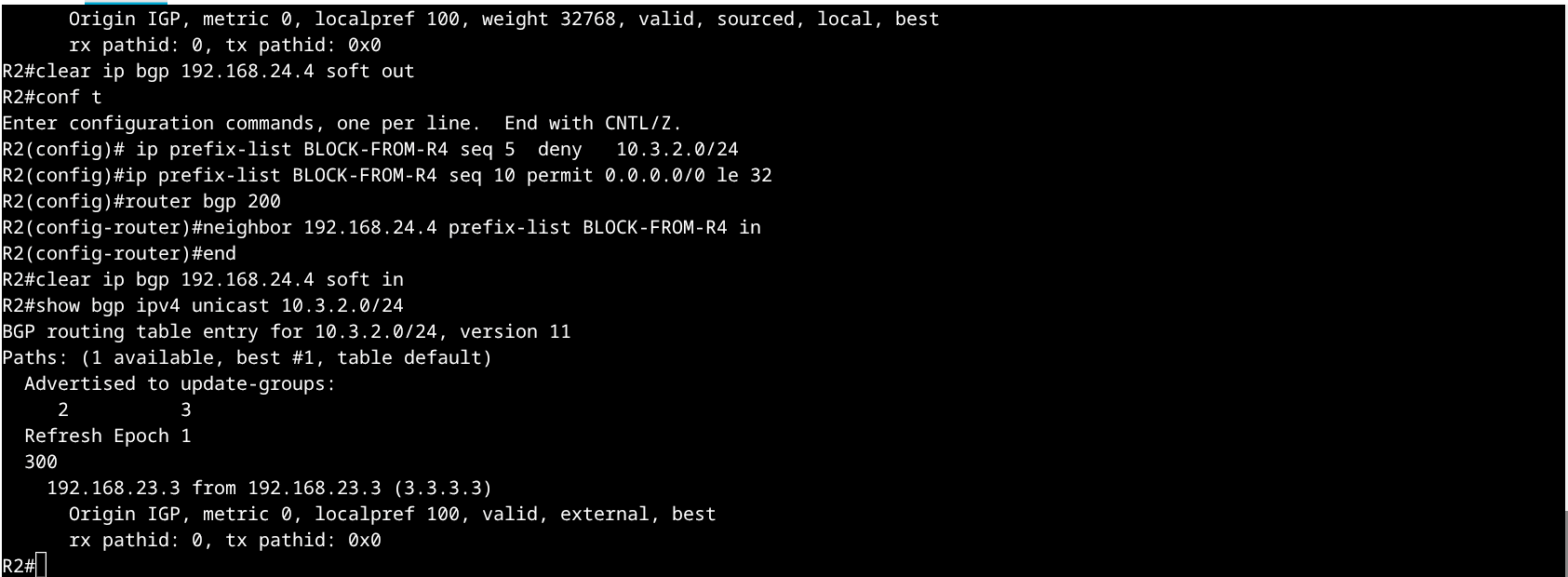
Scenario: R2 should not accept 10.3.2.0/24 from R4 at all — only from R3.
R2(config)# ip prefix-list BLOCK-FROM-R4 seq 5  deny   10.3.2.0/24
R2(config)# ip prefix-list BLOCK-FROM-R4 seq 10 permit 0.0.0.0/0 le 32

R2(config)# router bgp 200
R2(config-router)#  neighbor 192.168.24.4 prefix-list BLOCK-FROM-R4 in
R2(config-router)#  end
R2# clear ip bgp 192.168.24.4 soft in
R2# show bgp ipv4 unicast 10.3.2.0/24
Only one path should remain — via 192.168.23.3 (R3 / AS300). The R4 path should be gone.
Use this checklist to confirm you have completed all exercises:
10.3.1.0/24 best path on R2 has local preference 200 via R3 (Ex. 1)10.3.2.0/24 shown on R4 with AS-path 200 200 200 300 (Ex. 2)2.2.2.2/32 shown on R1 with metric (MED) of 50 (Ex. 3)10.1.1.0/24 shown on R2 with community 100:500 and local-pref 300 (Ex. 4)10.3.2.0/24 on R2 has only one path (via R3), R4 path filtered out (Ex. 5)| # | Attribute | Prefer | Scope |
|---|---|---|---|
| 1 | Weight | Higher | Cisco local only |
| 2 | Local Preference | Higher | Within AS |
| 3 | Locally originated | Local wins | — |
| 4 | AS Path Length | Shorter | eBGP |
| 5 | Origin | IGP > EGP > ? | — |
| 6 | MED | Lower | Same neighbour AS |
| 7 | eBGP over iBGP | eBGP | — |
| 8 | IGP metric to next-hop | Lower | — |
| 9 | Router ID | Lower | Tiebreak |
! Show full BGP table
show bgp ipv4 unicast

! Show detail for a specific prefix
show bgp ipv4 unicast 10.3.1.0/24

! Show neighbour summary
show bgp ipv4 unicast summary

! Show all routes received from a peer (before policy)
show bgp ipv4 unicast neighbors 192.168.23.3 received-routes

! Show routes advertised to a peer (after policy)
show bgp ipv4 unicast neighbors 192.168.23.3 advertised-routes

! Soft reset inbound (re-apply inbound policy without dropping session)
clear ip bgp 192.168.23.3 soft in

! Soft reset outbound
clear ip bgp 192.168.23.3 soft out

! Debug BGP updates (use sparingly)
debug ip bgp 192.168.23.3 updates
Completed the core exercises? Try these additional challenges:
neighbor X.X.X.X weight to prefer R3 without a route-map. Compare weight vs local-pref behaviour.neighbor advertise-map … exist-map to advertise a prefix only when another prefix exists.no-export on R2 and verify R3 does not propagate it further.Pro tip: Use show bgp ipv4 unicast neighbors X.X.X.X policy on newer IOS-XE versions to see exactly which route-maps and prefix-lists are applied to a peer in each direction.
Lab version 1.0 · Platform: Cisco Modeling Labs 2.x · Node type: IOSv · Topology: 4 routers / 3 eBGP sessions