CML + BGP Practice Lab
Python automation that builds a four-router BGP lab in Cisco Modeling Labs covering all the fundamentals: eBGP between three ASes, iBGP inside one of them, loopback advertisement, and next-hop-self on the iBGP pair. Good baseline for practicing route-maps, LOCAL_PREF, AS_PATH prepending, and path selection.
Script: bgp_lab_setup.py
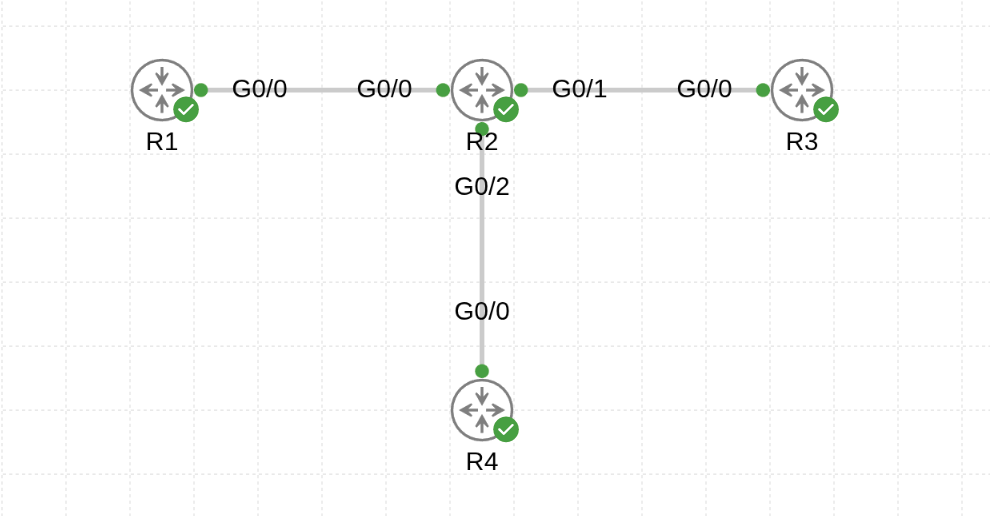
Topology
                       iBGP
        AS 65001         |          AS 65003
       ┌──────┐  eBGP  ┌─┴────┐  eBGP  ┌──────┐
       │  R1  │────────│  R2  │────────│  R3  │
       └──────┘        └───┬──┘        └──────┘
                           │
                       ┌───┴──┐
                       │  R4  │   (AS 65002, iBGP with R2)
                       └──────┘
Addressing
| Router | AS | Loopback0 | Role |
|---|---|---|---|
| R1 | 65001 | 1.1.1.1/32 |
eBGP peer with R2 |
| R2 | 65002 | 2.2.2.2/32 |
Transit: eBGP to R1 & R3, iBGP to R4 |
| R3 | 65003 | 3.3.3.3/32 |
eBGP peer with R2 |
| R4 | 65002 | 4.4.4.4/32 |
iBGP peer with R2 |
Point-to-point /30s:
| Link | Subnet | Addresses |
|---|---|---|
| R1 ↔︎ R2 | 10.0.12.0/30 |
R1=.1, R2=.2 |
| R2 ↔︎ R3 | 10.0.23.0/30 |
R2=.2, R3=.3 |
| R2 ↔︎ R4 | 10.0.24.0/30 |
R2=.2, R4=.4 |
Every router ships with username cisco / password cisco (enable: cisco) baked into its startup-config.
Prerequisites
- CML 2.x controller with the
iosvnode definition installed - Python 3.9+ and:
pip install virl2_clientRun it
The script is interactive — it prompts for CML host, credentials, and lab name:
python bgp_lab_setup.pyExample session:
=======================================================
  CML BGP Practice Lab Builder
=======================================================
CML host or IP: cml.example.com
Username [admin]:
Password: ********
Lab name [BGP-Practice]:

[+] Connecting to https://cml.example.com ...
[+] Connected.
[+] Creating lab 'BGP-Practice' ...
[+] Creating routers ...
    + R1  AS65001  Lo0=1.1.1.1
    + R2  AS65002  Lo0=2.2.2.2
    + R3  AS65003  Lo0=3.3.3.3
    + R4  AS65002  Lo0=4.4.4.4
[+] Wiring links ...
    R1(GigabitEthernet0/1, 10.0.12.1) <-> R2(GigabitEthernet0/1, 10.0.12.2)
    R2(GigabitEthernet0/2, 10.0.23.2) <-> R3(GigabitEthernet0/1, 10.0.23.3)
    R2(GigabitEthernet0/3, 10.0.24.2) <-> R4(GigabitEthernet0/1, 10.0.24.4)
[+] Generating and pushing configs ...
    + config applied to R1
    + config applied to R2
    + config applied to R3
    + config applied to R4

[+] Starting lab (IOSv first boot takes a few minutes) ...
Verify BGP convergence
Wait ~60–90 seconds after the lab reports running, then check the control plane. R2 is the most interesting node since it peers with everyone:
R2# show ip bgp summary
Neighbor        V    AS  MsgRcvd  MsgSent   TblVer  InQ OutQ Up/Down  State/PfxRcd
10.0.12.1       4 65001       11       13        6    0    0 00:08:22        1
10.0.23.3       4 65003       10       12        6    0    0 00:08:15        1
10.0.24.4       4 65002        9       11        6    0    0 00:08:06        1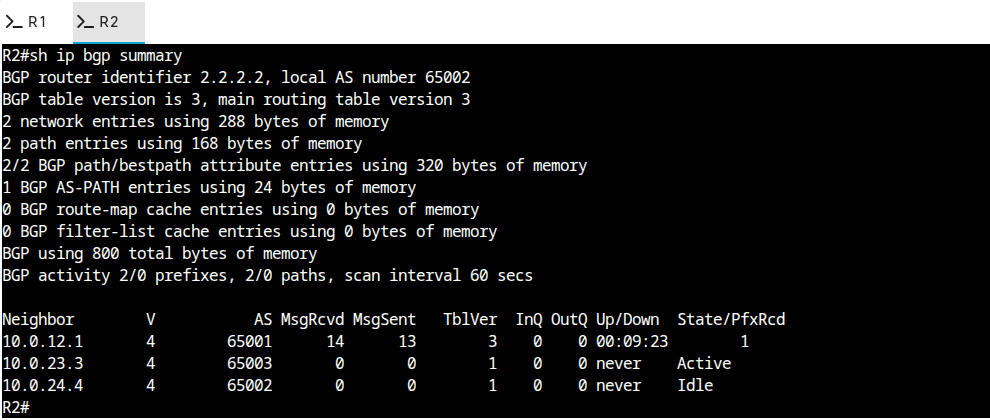
End-to-end checks from edge routers:
R1# show ip route bgp         (expect 2/3/4.*.*.* via R2)
R3# show ip bgp               (expect 1.1.1.1 and 4.4.4.4 via R2)
R4# show ip bgp               (learns 1.1.1.1/3.3.3.3 from R2 via iBGP)
If R4 is seeing the prefixes from R1 and R3 but can't reach them, remember: R2 announces them with itself as next hop only because of neighbor 10.0.24.4 next-hop-self on the iBGP session. Without that, R4 would resolve the next-hop to the eBGP peer's IP, which isn't in its IGP.
What the script actually does
- Prompts for controller URL, credentials, and lab name (no hardcoded secrets).
- Connects via
virl2_client.ClientLibrarywithssl_verify=False(flip toTrueand trust the CA for real deployments). - Creates the lab and places four IOSv nodes at fixed coordinates so the layout is consistent between runs.
- Wires three
/30links usingnext_available_interface()— the script records the interface label and /30 address for both ends of every link. - Generates each router's startup-config from a template: service timestamps, hostname,
no ip domain lookup,ip cef, ausername/enable secret,Loopback0, a stanza per physical interface, and arouter bgp <asn>block that advertises the loopback and peers with every directly-connected neighbor. - Adds
next-hop-selfautomatically whenever the peer ASN matches the local ASN (i.e. iBGP). - Boots the lab with
lab.start(wait=True)and prints the first handful of verification commands.
Experiments to run next
The lab is designed so you can keep extending it without rebuilding:
- Filter 4.4.4.4/32 from being advertised out of AS 65002 — prefix-list + route-map on R2's eBGP sessions. Watch R1 and R3 stop hearing about it.
- LOCAL_PREF — set LOCAL_PREF on R2 for prefixes learned from R1 vs R3 and observe the change in R2's path selection.
- AS_PATH prepending — prepend on R3's outbound updates and watch R1 prefer the AS 65001 → AS 65002 → AS 65003 path over any alternative you introduce.
- Second eBGP link — add an R1 ↔︎ R3
/30and see how path selection breaks the tie (router-id / neighbor address). - Route reflection — scale AS 65002 up: add R5 in AS 65002 and make R2 a route-reflector for R4 and R5 instead of full-mesh iBGP.
- Telemetry — wire each router into the observability stack (SNMP for IOSv) and watch BGP neighbor state flap in Grafana as you tear links down.
Troubleshooting
Node definition 'iosv' not found— install the IOSv image on the CML controller.iosvl2won't work (it's layer-2 only).- Neighbors stuck in
IdleorActive— verify L3 reachability first:ping 10.0.12.2 source 10.0.12.1. BGP can't peer if the transport can't. - iBGP session up but no prefixes in R4's table — check
neighbor 10.0.24.4 next-hop-selfis configured on R2. Without it R4 will receive prefixes but with an unreachable next-hop and silently discard them. - Path selection seems wrong — remember the order: WEIGHT → LOCAL_PREF → locally originated → shortest AS_PATH → origin → MED → eBGP over iBGP → closest next-hop → router-id tiebreaker.
show ip bgp <prefix>shows the attributes used.