CML + OSPF Triangle Lab
Python automation that builds a 3-router OSPF triangle in Cisco Modeling Labs (CML 2.x) end-to-end: create the lab, drop in three IOSv routers, wire them in a triangle, push day-0 configs with OSPF area 0 on every link, and start the lab. One command, reproducible topology.
Script: CML_OSPF_Basic_conf.py
Topology
        R1 (1.1.1.1)
        /          \
 10.0.12.0/30   10.0.13.0/30
      /              \
   R2 (2.2.2.2) --- R3 (3.3.3.3)
10.0.23.0/30- Three IOSv routers:
R1,R2,R3 - Three
/30point-to-point links in a triangle - Loopback0 on each router (
1.1.1.1,2.2.2.2,3.3.3.3) advertised into OSPF - All links in OSPF area 0 (single area, no summarisation)
Prerequisites
- A reachable CML 2.x controller (tested against 2.7)
- The
iosvnode definition installed on the controller - Python 3.9+ and the official CML client:
pip install virl2-clientConfigure credentials
Set via environment variables (preferred) or edit the constants near the top of the script:
export CML_URL=https://cml.example.com
export CML_USERNAME=admin
export CML_PASSWORD='changeme'
ssl_verify=Falseis set in the script for lab use. Flip toTrueand trust the CA when pointing at a real controller.
Run it
python CML_OSPF_Basic_conf.pyExpected output:
Created lab '3-Router OSPF Triangle' (id=<uuid>)
Nodes and links created. Starting lab...
Lab is running.

Verify once routers boot (~1-2 min):
  R1# show ip ospf neighbor
  R1# show ip route ospf
  R1# ping 3.3.3.3 source 1.1.1.1
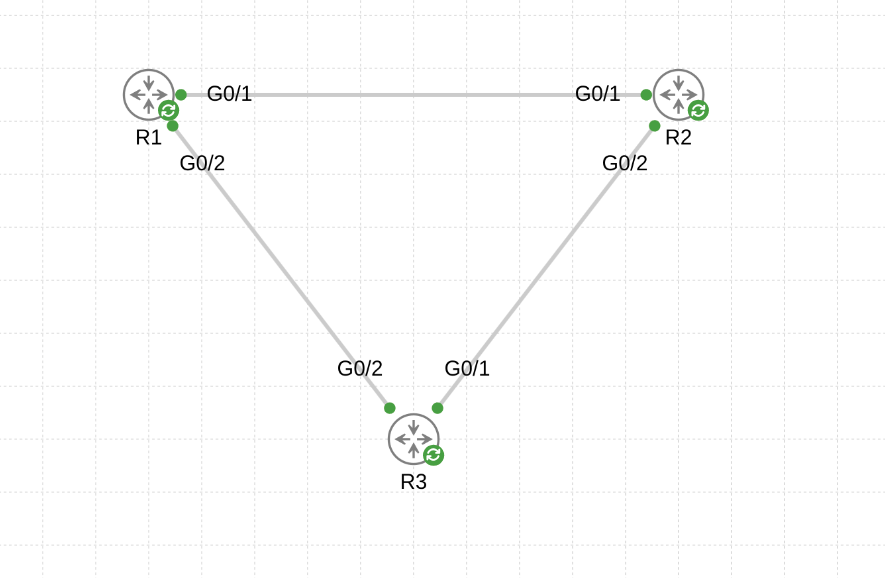
The lab appears in the CML UI with the three nodes laid out as a triangle:
What the script actually does
- Connects to CML using
virl2_client.ClientLibraryand waits for the controller to report ready. - Creates a lab titled 3-Router OSPF Triangle.
- Creates three
iosvnodes (R1,R2,R3) at fixed coordinates so the layout is always identical. - Assigns day-0 configs to each node as a single multi-line string — interfaces, loopback, and
router ospf 1stanza. - Pads physical interfaces. IOSv nodes are created with
Gi0/0only; the helperensure_interfaces()callscreate_interface()until each node has three slots (Gi0/0,Gi0/1,Gi0/2). - Wires the triangle using
lab.create_link()against specificphysical_interfaces[n]so the slot numbers line up with what the day-0 configs expect. - Starts the lab — nodes boot and load their configs.
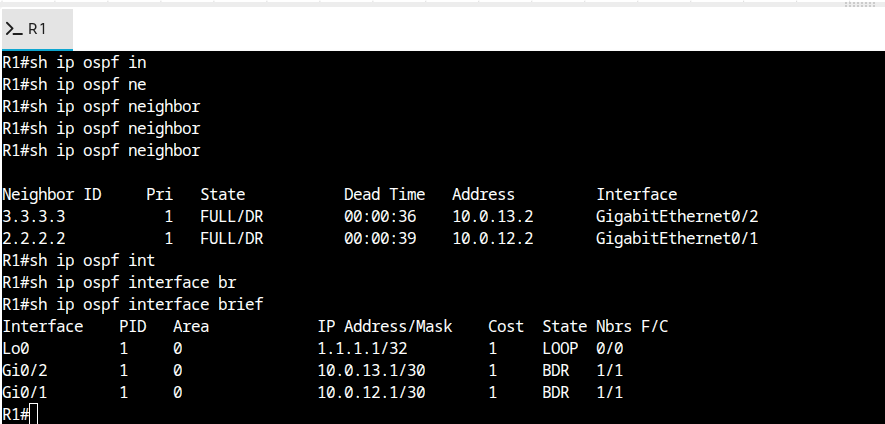
Verify OSPF convergence
Once nodes boot (~1–2 minutes), open a console to R1 and check neighbors and routes:
R1# show ip ospf neighbor
Neighbor ID     Pri   State           Dead Time   Address         Interface
2.2.2.2           1   FULL/BDR        00:00:35    10.0.12.2       GigabitEthernet0/1
3.3.3.3           1   FULL/BDR        00:00:38    10.0.13.2       GigabitEthernet0/2

R1# show ip route ospf
     2.0.0.0/32 is subnetted, 1 subnets
O       2.2.2.2 [110/2] via 10.0.12.2, ...
     3.0.0.0/32 is subnetted, 1 subnets
O       3.3.3.3 [110/2] via 10.0.13.2, ...
O    10.0.23.0/30 [110/2] via 10.0.12.2, ...
                         [110/2] via 10.0.13.2, ...
End-to-end reachability across loopbacks confirms the control plane is working:
Extending the lab
Things to bolt on once the basic triangle is healthy:
- More areas — split one link into area 1, add ABR logic and inter-area summarisation (
area 1 range ...). - Authentication — MD5 or SHA on each interface:
ip ospf authentication message-digest. - Timers — dial down hello/dead for sub-second convergence; test with a link flap.
- BFD — enable BFD on the links and have OSPF register for fast failure detection.
- Telemetry — wire each router into the observability stack via IOS-XR MDT (or SNMP for IOSv) and watch neighbor state flap in Grafana as you tear links down.
Troubleshooting
Node definition 'iosv' not found— install the IOSv image on the CML controller;iosvl2won't work (layer-2 only).- Interface index errors — the script assumes
create_interface()adds the next sequential slot. If your controller's node definition pre-creates more or fewer interfaces, adjustensure_interfaces(node, 3). - Neighbors stuck in
EXSTART/EXCHANGE— usually an MTU mismatch. Set matchingip mtu 1500on both ends or addip ospf mtu-ignore. - No OSPF neighbors at all — check the link came up at L1 (
show ip interface brief) and that no subinterface or CDP-only VLAN tagging is in the way.